Moving from design to deployment
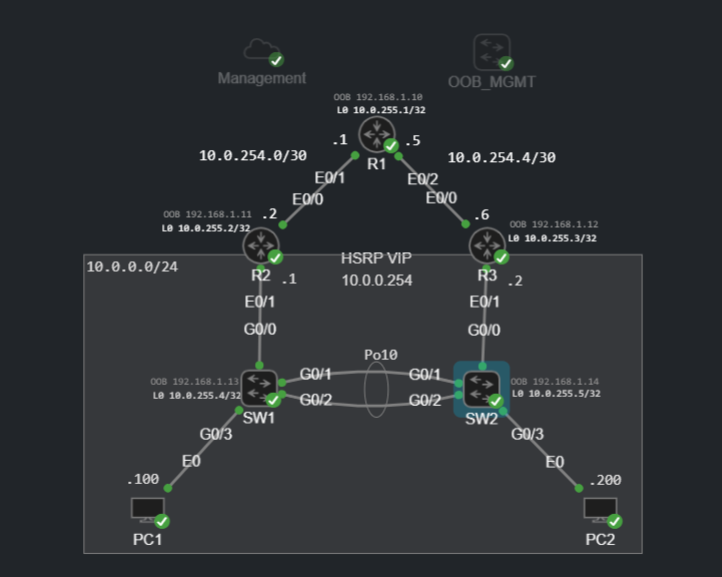
This weekend I made more progress on the infrastructure-as-code lab. In the first post, I had the CML topology and supporting virtual machines in place. Today, I connected NetBox to Ansible, used NetBox as the dynamic inventory, rendered a separate IOS configuration for each device and deployed those configurations to the lab.
This is the first point at which the workflow has started to feel like infrastructure as code rather than a collection of separate tools:
- NetBox holds the intended device and interface data.
- Ansible builds its inventory directly from NetBox.
- A Jinja2 template renders a configuration for each device.
- A separate playbook deploys the rendered configuration to Cisco IOS.
- Ansible compares the proposed configuration with the running configuration.
NetBox as the SSoT
I populated NetBox with the devices, interfaces, IP addresses, interface descriptions and platform information from the CML topology.
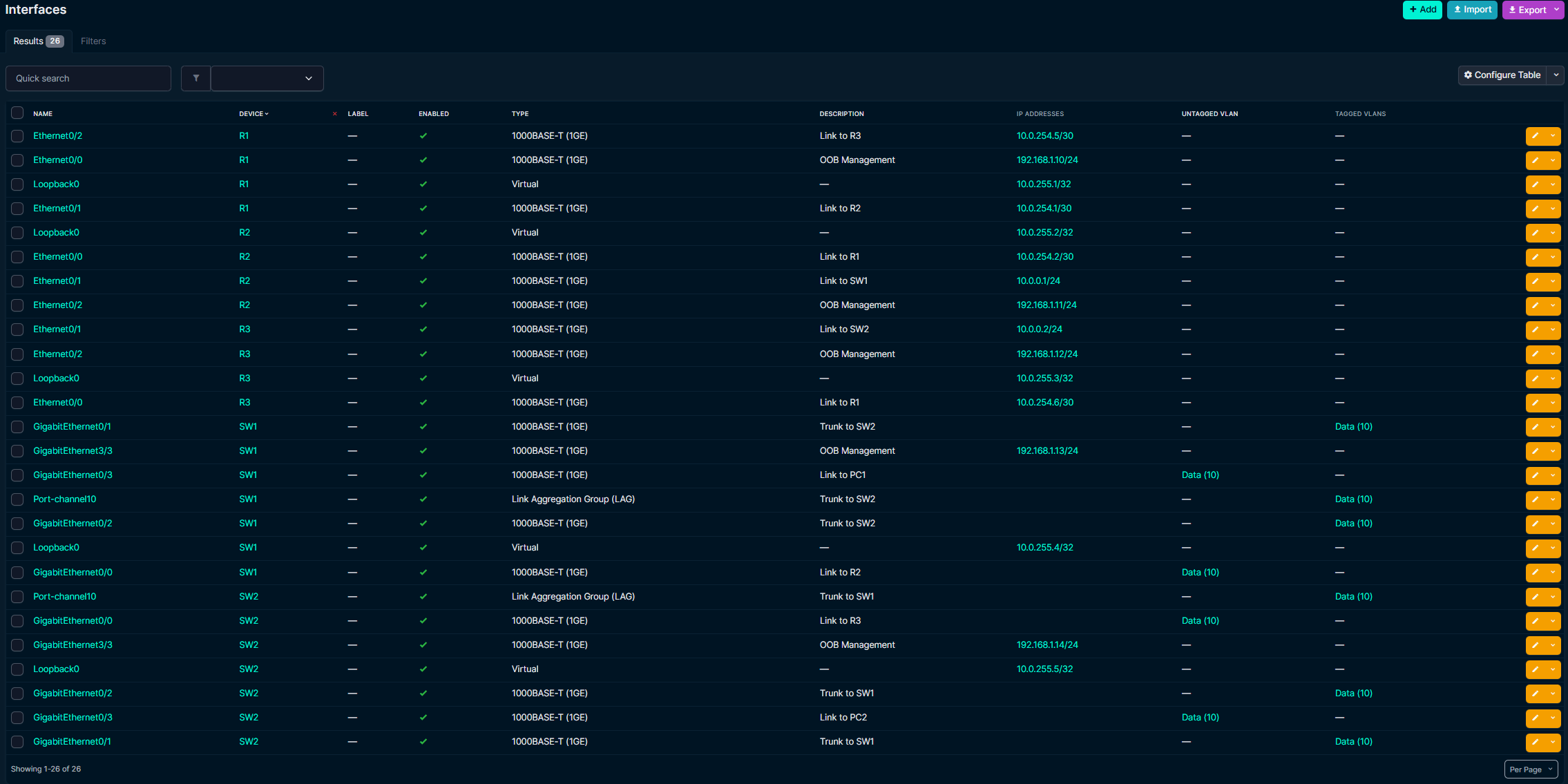
Instead of maintaining a separate static Ansible inventory, I am using the netbox.netbox.nb_inventory inventory plugin. This means the device list and relevant data come directly from the source of truth:
plugin: netbox.netbox.nb_inventory

api_endpoint: https://netbox.example.local
token:
  type: Bearer
  value: !vault |
    <encrypted token omitted>

validate_certs: false # Lab only; use a trusted certificate in production.
interfaces: true

group_by:
  - device_roles
  - platforms
Rendering the configurations
I split configuration generation and deployment into separate playbooks. The first playbook creates the generated directory and renders one configuration file per inventory host from the ios_base.j2 template:
---
- name: Render IOS configurations
  hosts: all
  gather_facts: false

  tasks:
    - name: Ensure generated directory exists
      ansible.builtin.file:
        path: "{{ playbook_dir }}/../generated"
        state: directory
      delegate_to: localhost
      run_once: true

    - name: Render IOS configuration
      ansible.builtin.template:
        src: "{{ playbook_dir }}/../templates/ios_base.j2"
        dest: "{{ playbook_dir }}/../generated/{{ inventory_hostname }}.cfg"
      delegate_to: localhost
Both tasks run on the Ansible host rather than the network devices. run_once prevents every device from trying to create the same directory, while inventory_hostname gives each device its own rendered configuration file.
Keeping the generated files as an intermediate stage is useful because I can inspect exactly what Ansible intends to send before touching a device. It should also fit neatly into a future CI/CD pipeline, where the rendered output can be linted, reviewed and retained as a build artifact.
Deploying to IOS
The deployment playbook takes the generated file for each host and applies it using cisco.ios.ios_config:
---
- name: Deploy rendered IOS configuration
  hosts: all
  gather_facts: false

  tasks:
    - name: Deploy generated configuration
      cisco.ios.ios_config:
        src: "{{ playbook_dir }}/../generated/{{ inventory_hostname }}.cfg"
        diff_against: running
Using diff_against: running gives me visibility into how the rendered intent differs from the live device. More importantly, separating rendering from deployment creates a clear review point between generating a change and applying it. The playbook currently targets the whole lab inventory; a later iteration will restrict deployments to the relevant IOS inventory group and introduce changes in smaller batches.
What went well
The dynamic inventory is the biggest improvement in this iteration. Device and interface data now lives in one place, and Ansible consumes that data rather than relying on a second manually maintained inventory.
What comes next
The next stage is to make this workflow safer and more automated. I plan to add:
- Validation and linting before deployment
- Check mode and a reviewable configuration diff
- GitLab CI/CD stages for render, validate, deploy and test
- pyATS post-change tests for reachability, routing and redundancy
- Configuration backups and a defined rollback path
- An idempotence check confirming that a second run produces no changes
The eventual goal is a pipeline where NetBox defines the intended state, GitLab controls the change, Ansible performs the deployment and pyATS proves that the network still behaves as expected.